
Hola VPN for Windows: Browse Without Region Limits
A peer-to-peer proxy and VPN service for Windows desktop. Browse with more privacy and reach region-locked content.
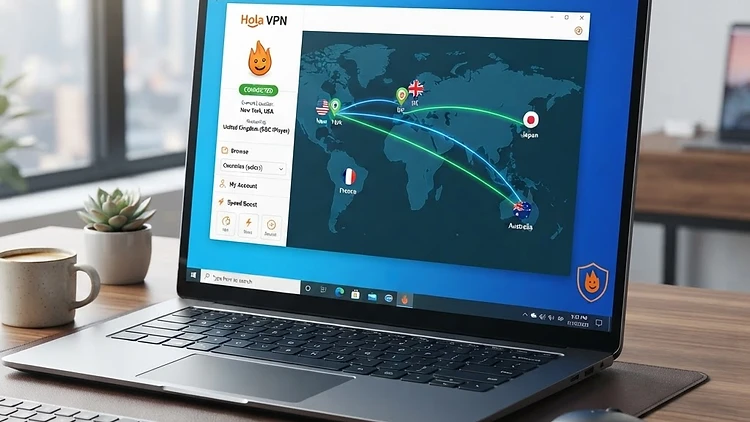
The Hola VPN desktop app for Windows
US
windows
A few minutes to install
Free
18+
Ad: This is a sponsored offer. Freebies House earns a commission if you sign up through this link. You are never obligated to complete an offer — read the requirements carefully before starting.
The Hola VPN desktop app for Windows
Estimated delivery: Ready to use once installed
Ad: This is a sponsored offer. Freebies House earns a commission if you sign up through this link. You are never obligated to complete an offer — read the requirements carefully before starting.
How to Claim, Step by Step
Here's exactly what to do to get the hola vpn desktop app for windows. No guessing.
- 1
Download
Download the Hola VPN desktop app for Windows from the landing page.
- 2
Install
Run the installer on your Windows desktop. Windows only — not available for mobile or other platforms.
- 3
Pick a location
Open the app and choose a location to route your connection through.
Ad: This is a sponsored offer. Freebies House earns a commission if you sign up through this link. You are never obligated to complete an offer — read the requirements carefully before starting.
The Hola VPN desktop app for Windows
Estimated delivery: Ready to use once installed
About This Offer
Hola VPN for Windows provides a desktop application that allows users to access content that might be restricted based on their geographical location. Unlike a traditional VPN service that routes your traffic through a central server owned by the provider, Hola operates as a peer-to-peer proxy network. When you activate the service, your internet traffic is routed through the connections of other users who are part of the Hola network. This design allows users to effectively borrow the IP addresses of peers located in different countries, which is the primary method used to bypass regional content filters on streaming platforms or websites.
Because the network relies on the bandwidth of other users, the service functions differently than standard security tools. The company generates revenue by offering a paid version of the software and, in some cases, by utilizing the idle resources of free users. By joining the network, your own device may be used as a node to route traffic for other people. You should consider whether you are comfortable with this trade-off before installing the software, as it differs from the typical subscription model where you pay for private, dedicated server access.
Privacy is a major factor to keep in mind here. Because this is not a traditional no-logs service, your browsing habits might be monitored or recorded by the company. If your goal is high-level anonymity or protecting sensitive personal information, this tool might not be the right fit. It is primarily built for users who want to view region-locked content and are less concerned with complete traffic encryption. Always read the privacy policy carefully before proceeding, as it explains exactly how your data and bandwidth are handled while the application is active on your computer.
Installation is straightforward for Windows users. Once you download and run the installer, the application integrates into your browser or desktop environment to let you toggle the connection on and off. You will need to select the specific country you want to appear to be browsing from. Keep in mind that performance depends on the quality of the connections provided by other peers in the network. If the peer you are connected to has a slow internet connection, your browsing experience will also be slow. This is a common occurrence in peer-to-peer networks and is something you should expect when using the free version of this app.
The service is restricted to Windows desktop environments. It does not provide protection or bypass capabilities for your mobile devices, Mac, or other operating systems. If you need a comprehensive privacy suite that covers all your devices, you may need to look at other, more conventional VPN providers. This offer is best suited for a casual user who needs to bypass a simple location block on their PC and does not want to deal with complex configuration settings or subscription costs for a dedicated server network.
Is It Legit? The Honest Take
Here's what you actually get, and what the company gets out of you in return.
The Promise
The Hola VPN desktop app for Windows
- • Efficient at bypassing regional content restrictions on streaming websites
- • Simple one-click interface for changing your apparent browsing location
- • No mandatory upfront subscription cost for the standard version
- • Quick and easy installation process for Windows users
The Reality
Hola VPN is a legitimate company that provides a functional peer-to-peer network tool for Windows. Their business model relies on a combination of premium subscriptions and the use of free users' idle bandwidth to facilitate their network traffic.
- • US residency
- • Windows desktop operating system
- • Active internet connection
Sarah Mitchell is the Senior Deals Editor at Freebies House. She has spent 8 years covering consumer promotions, reward programs, and free sample offers across the US, Canadian, UK, Australian, and New Zealand markets. Before joining Freebies House, Sarah worked as a retail analyst at a major market research firm, where she tracked consumer promotion trends for Fortune 500 brands. She is based in Austin, Texas.
Read more about SarahPros & Cons
Pros
- Efficient at bypassing regional content restrictions on streaming websites
- Simple one-click interface for changing your apparent browsing location
- No mandatory upfront subscription cost for the standard version
- Quick and easy installation process for Windows users
Cons
- Uses your computer as a peer-to-peer exit node for other users
- Does not offer the strict no-logs policy found with premium VPNs
- Browsing speeds can fluctuate based on the quality of the peer connection
Eligibility Notes
This offer is available only to residents of the United States who are 18 years of age or older. You must have a compatible Windows desktop computer and a reliable internet connection to successfully install and use the application.
Hola VPN for Windows: Browse Without Region Limits — FAQ
Ad: This is a sponsored offer. Freebies House earns a commission if you sign up through this link. You are never obligated to complete an offer — read the requirements carefully before starting.
The Hola VPN desktop app for Windows
Estimated delivery: Ready to use once installed
Want more offers like this?
Get verified freebies and cash giveaways sent to your inbox. No spam, unsubscribe anytime.
Similar Offers You Might Like
Not quite your thing? Here are others in the same category worth a look.
| Offer | What You Get | Time to Receive | Eligibility | Verified |
|---|---|---|---|---|
| Little Lunches | 50% off an annual Little Lunches meal-planning subscription, including personalized plans for kids from 6 months to early school age, nutritious recipes, and streamlined grocery shopping. | Instant app access after subscription starts | US, CA, GB, AU, NZ | Verified |
| Audiobooks.com | 3 free audiobooks: 1 from the full library of 700,000+ titles plus 2 bonus audiobooks from the exclusive VIP section, with a 30-day free trial. | Instant access to all 3 audiobooks after signup | US, CA, GB, AU, NZ | Verified |
| JustAnswer | Chat answer to your home improvement question from a verified expert | Instant chat reply | US, CA, AU, UK | Verified |
Related Offers
50% off an annual Little Lunches meal-planning subscription, including personalized plans for kids from 6 months to early school age, nutritious recipes, and streamlined grocery shopping.
A subscription meal-planning app for families, with personalized plans for kids from 6 months up. Nutritious recipes, simplified planning, and simplified grocery shopping. 50% off annual plans.
3 free audiobooks: 1 from the full library of 700,000+ titles plus 2 bonus audiobooks from the exclusive VIP section, with a 30-day free trial.
Get 3 audiobooks free with a 30-day trial - 1 from the full library plus 2 bonus VIP books. $14.95/month after, cancel anytime.
Chat answer to your home improvement question from a verified expert
Chat with a verified home improvement expert - plumbing, electrical, appliances, HVAC and DIY. Get an answer usually within minutes, any time of day.
Looking for more from Hola VPN? See all Hola VPN offers →